• Skip to primary navigation
  • Skip to main content
  • Skip to primary sidebar
Average But Inspired logo - DIY and craft

Average But Inspired

Craft a home you love. DIY and craft tutorials.

  • About
    • Contact Me
    • Disclosures
    • Privacy Policy and Copyright Policy
  • DIY
    • Furniture
  • Crafts
    • Dollar Store Crafts
    • Seasonal
      • Patriotic & Summer
      • Valentine’s Day
      • Easter & Spring
      • Fall & Halloween
      • Christmas & Winter
  • Home Decor
    • Organization
  • Shop
    • DIY Guides
  • Home

Crafts

10 Reasons Crafters Will Love the xTool M1 Laser and Blade Cutter

January 12, 2023 by Bre 6 Comments

As a lifelong crafter and DIY’er, I’ve been amazed at the proliferation of craft technology products in recent years.

And to be honest, I’ve been slow to embrace such machines. I took a strange pride in using craft tech only when absolutely necessary.

However, I was given the chance to review the xTool M1 Laser Engraver and Cutter, and I couldn’t pass it up. It looked way too cool not to!

The xTool M1 is a hybrid laser cutter and blade cutter machine: the first of its kind! It can laser cut, engrave, and score, and also blade cut. This allows it to work with over 300 materials! Find out why I think it's a great laser cutter for crafters, hobbyists, and small businesses.

Thank you to xTool for giving me the products featured in this post. The projects and opinions expressed herein are all my own. Also, this post contains affiliate links. Please read my disclosure policy for more information.

This all-in-one machine is a PERFECT size and scope for crafters, hobbyists, and small business owners, and it has so many amazing features. I can’t wait to show you my favorites!

What is the xTool M1?

The xTool M1 is an enclosed hybrid laser and blade cutting machine that cuts, engraves, etches, and scores a multitude of materials. (And by multitude, I mean like over 300 materials!)

Think of it as a Cricut machine x100.

I’ve been testing and experimenting with the machine over the past several weeks, and I can’t say enough about its capabilities.

How User-Friendly is this Laser Cutter and Engraver?

To me, this laser cutter and engraver was simple to set up and is intuitive to use.

I’m not sure if I missed something, but I didn’t locate any type of comprehensive beginner guide on how to use all of the features though. That was surprising to me.

In order to learn best practices for cutting and engraving specific materials, I turned to YouTube and Google. Creators with project tutorials have been the best way of learning – for me at least!

Expect there to be trial and error. You will make mistakes. That is the best way of learning though!

What are the Benefits of the xTool M1?

There are so many benefits of the xTool M1, and I’m going to tell you about my favorites.

As I continue to work with the machine and make more difficult projects, I will update this review.

1. Setup is Easy

When the M1 arrived on my doorstep, I was a little intimidated. The box was huge!

The hardest part of setup was getting the machine out of the box. Let’s just say that xTool has the efficient packing down to a science.

The xTool M1 laser cutter and blade cutter arrives nicely packaged.

Once I actually got to the product, within ten minutes I had the whole thing set up. All you have to do is attach the ventilation tube, plug in the outlet, and plug in the USB cable to the back of the M1.

The xTool M1 laser cutter must be vented out a window when being used on the laser cut function.

2. The xTool M1 Works With Over 300 Materials

Okay, as I mentioned above, this laser machine is able to cut and engrave just about any material you could want or need!

I won’t list the 300+ items here, but instead, I’ll give you the highlights (you’re welcome):

  • Wood (basswood and more): cut and engrave
  • Metal: engrave (very thin stainless steel may be cut)
  • Leather: cut and engrave
  • Colored Acrylic (clear requires modifications): cut and engrave
  • Vinyl: cut
  • Paper: cut
  • Rubber: cut and engrave
  • Rock: engrave
  • Cardboard: cut
  • Fabric: cut

Because it works on so many materials, and because it can cut, engrave, and score, the M1 could replace any other craft technology you have or want. Let that sink in.

Plus, you can purchase materials and materials bundles right from xTool, which ensures they’ll work perfectly with the laser and blade cutter.

The xTool M1 has a premium materials package. This laser cutter can be used with over 300 different materials.

3. The List of Materials You Can’t Use with xTool M1 is Small

And, the list of materials you cannot laser cut with the xTool M1 is small. I don’t even know what half of these items are, so I don’t think it’s hard to avoid using them!

According to xTool, some of the materials you should not laser cut or laser engrave with the xTool M1 include:

  • PVC
  • Polycarbonate
  • ABS
  • Polystyrene and Polypropylene Foam
  • HDPE
  • Coated Carbon Fiber

Again, these aren’t your everyday craft store items, so these materials don’t limit your ability to use the laser cutter in any way of import. (NOTE: this list is for the laser cutter; not the blade cutting feature.)

4. The Project Possibilities are Endless with xTool M1

I can’t adequately express how there is no limit to what you can make with the M1 laser cutter and engraver. Seriously, and as cliche as this sounds, you’re only limited by the extent of your imagination!

For my first project, I engraved a slate coaster with the logo of my husband’s favorite team and his name. He doesn’t usually get excited about my projects, but he loved this!

This slate coaster was engraved with the xTool M1. It is a wonderful laser cutter for crafters, hobbyists, and small businesses.

After that, I upped the ante and moved on to cutting and engraving wood. I made an adorable wood gift card holder. I colored it in with paint markers and couldn’t believe how cute it was.

This wood cupcake gift card holder was cut and engraved with the xTool M1. It is a wonderful laser cutter for crafters, hobbyists, and small businesses.

Then I used the blade cutting feature to cut a glossy red acrylic sheet and translucent acrylic sheet into hearts to make super cute Valentine’s Day Lights.

This Valentine light garland was made with the xTool M1. It is a wonderful laser cutter for crafters, hobbyists, and small businesses.

But there’s so much more that I want to make!

I’m especially excited to engrave photos onto objects (YES, you can do that!), and engrave my own handwriting (or loved ones’ handwriting) onto things. That is so cool!

I will continue to update this list as I make more projects with my hybrid laser cutter engraver.

5. The Rotary Attachment Lets You Engrave Curved Surfaces

One amazing feature of the xTool M1 is that you aren’t limited to cutting and engraving flat surfaces.

With the Rotary Attachment, RA2 Pro, you can also engrave curved surfaces like tumblers, coffee cups, wine glasses, and more!

I haven’t used the rotary engraver yet, but I will update this post when I do.

Learn more and shop all xTool products in their online store! Save 10% with code ABI10!

6. You Can Use the M1 Indoors or Outdoors

As with all laser cutters and engravers, you must properly vent the machine when using the laser feature (not the blade cut feature). Laser cutters give off fumes that need to be released outside – not trapped indoors!

The xTool M1 can be vented right out of a window, which means that it can be used indoors or outside.

When I use the machine, I open the window and point the attached ventilation tube to the outside. If it’s very cold (I live in Wisconsin, so it’s usually very cold!), I stuff a blanket around the tube to keep as much of the cold air out of my house as possible.

Vent the xTool M1 out the window when using it on the laser cut function.

I also run my air purifier for extra odor and fume removal, but having an air purifier isn’t necessary.

I have seen more permanent solutions where people use plywood to fill in the window area around the ventilation tube. This is similar to when people put window unit air conditioners in their homes.

And, if this sounds like too much trouble, xTool has introduced the Smoke Purifier product, which lets you attach the M1 ventilation tube to the Smoke Purifier for proper ventilation! That means you don’t have to vent it out a window!

The fact that you aren’t limited to using the M1 outside is really wonderful. I know that I, for one, would not like working in my garage in the winter!

7. You Can Easily Store the xTool M1

My craft area is in a corner of my basement where I don’t have a window nearby.

Because of that, I purchased this rolling cart to hold my laser cutting machine. It’s amazing because the xTool M1 sits on the top of the cart, and then the laser cutting accessories (like the RA2 Pro rotary attachment, the triangular prisms used to elevate items being cut, and the XTool M1 Premium Materials Box), fit in the drawers beneath.

I keep the machine in my home office, and roll it out of the closet up to the window when I’m ready to use it.

The xTool M1 is a perfect size for crafters, hobbyists, and small businesses. It can fit in a closet.

It stays out of sight when I don’t need it, and is easily accessible when I do. That is absolutely wonderful for a hobby laser cutter you’re not using every day; you don’t need it to be out on display all the time.

8. The Included Laser Engraver Software, Creative Space, is Easy to Use

A wonderful thing about the xTool laser products is that they work with xTool’s free laser engraver software, Creative Space. You don’t have to purchase any additional software if you don’t want to!

If you’ve ever used a Cricut or Silhouette machine, you’ll find Creative Space similar to those vinyl cutter’s design software.

Also, I was surprised that Creative Space uses the same types of files for cutting and engraving as is used for cutting vinyl; namely .svg files. There are tons of options for free cut files online, and for more advanced project files on places like Etsy.

My favorite thing in working with the Creative Space software is that the M1’s built-in camera allows the exact material you’re working with to show up on screen. This makes it foolproof to line up your design exactly right on the object (especially if it’s scrap material!).

xTool Creative Space software is free and easy to use.

The one drawback I’ve identified so far is that the software’s estimated time for projects is totally off. It always takes much longer for the machine to complete a project than it says it will.

9. The M1 is a Wonderful Glowforge Alternative

Being in the craft and DIY space, I’ve heard a lot about Glowforge over the years. (Glowforge is a very popular laser cutter and engraving machine. They invest a lot in marketing.)

At one point I considered buying one, but the steep price was a barrier. At the time of writing this article, Glowforge machines range in price from $3,995 for the basic model to $6,995 for the pro model.

Since publication, Glowforge has introduced the Glowforge Aura, which is most comparable in price and function to the xTool M1. You can read my complete comparison of Glowforge Aura and xTool M1 for more information on these two machines.

Note that none of the Glowforge machines features a blade cutter like the xTool M1. That means that the Glowforge cannot cut as many materials as easily as the M1 can.

10. The xTool Maker Community is Incredible

And finally, one unexpected (for me, at least) reason to love the M1 is the maker community involved with it.

Facebook groups aren’t usually my thing, but the M1 Facebook group is so helpful! It is filled with machine owners who are excited to share their successes, and who turn to the group for help with their failures.

People share their knowledge of things like cut settings and the best materials to buy on Amazon, for example. And I’ve never seen one rude comment (which is crazy for Facebook)!

****

In just a few short weeks of owning this amazing laser cutter, I have learned so much and gotten so many incredible project ideas. I am even wondering if I should sell items I make in my shop (the xTool M1 is great for small business owners)!

Please ask me any questions you have about this hybrid laser and blade cutting and engraving machine. I will do my best to answer or to steer you to where you will be able to find the answer!

And, stay tuned for more posts on projects I create with the xTool M1!
Filed Under: Crafts

3 Clever Window Cling Crafts

November 1, 2022 by Bre Leave a Comment

Three window cling crafts ideas that anyone can make!

Did you ever think to use decorative window clings on things OTHER than windows?

With their cute artwork, they shouldn’t be limited to just one use (in my opinion)! So, I came up with three easy window cling crafts that even the most novice crafter than make.

(Actually I’m wondering if only one of these can be considered a craft??? They’re that easy!)

Get a sheet of window clings at the dollar store and make these cute window cling crafts! They're super easy for all skill levels.

Anyway, I am using Dollar Tree Thanksgiving window clings in this post, but these projects are not limited to Thanksgiving. :-). Use window clings in any pattern or for any holiday to make these DIY projects fit the season you’re in!

This post contains affiliate links. For more information, please read my disclosure policy.

DIY Window Cling Place Cards

This is an example of an awesome Dollar Tree Thanksgiving craft. But again, swap out the window cling pattern to make this project for a different occasion or season.

Supplies Used

  • Dollar Tree ceramic tabletop signs
  • Dollar Tree window clings
  • Vis-a-vis wet erase marker

How to Make Window Cling Place Cards

This project is pretty self-explanatory, but I will walk you through it anyway!

Start with clean ceramic standing tabletop signs. Press a window cling onto the surface. Try to choose a cling that fits on the front of the piece, but if it doesn’t, you can trim it to size with regular scissors.

Once the window cling is in place, write your guest’s name on it with a wet erase marker. Using a wet erase marker (as opposed to dry erase marker), will ensure that the name doesn’t wipe off or get smudged during the course of the meal!

Use dollar store window clings to make adorable place cards for any occasion! These place cards are reusable, and the look can be changed easily.

Check out these adorable Thanksgiving Turkey Place Cards, too!

Once the event is over, wash off the guest’s name and place the window cling back onto the sheet on which it came – you can save it for next year!

DIY Window Cling Signs

Another great, but slightly more difficult, window cling craft is to make window cling signs!

You can make these in any size. Here I made one on a hanging wood round so that I could use this as a front door hanger/wreath.

Supplies Used

  • Wood round
  • Window clings
  • Mod Podge (matte finish)
  • Paint brush
  • Ribbon
  • Hot glue

How to Make Window Cling Signs

Start by figuring out the placement of the window clings on the sign base. Then, paint a very thin layer of Mod Podge onto the sign.

Press the window cling on top of it, and let it sit for about 20 minutes.

Then, paint a thin layer of Mod Podge on top of the window cling, and all over the entire sign. You will paint the entire face of the sign so that the finish, once dry, looks the same all over!

Let the Mod Podge dry, and repeat this process at least one more time. Three times is best!

Add a decorative ribbon to the top of the sign by attaching it with hot glue.

Use window clings to make DIY decorative signs! This is such an easy window cling craft idea.

It is that easy to make a decorative sign or door hanger with window clings!

You may also like this Dollar Tree Tin Tile Wall Art!

Dress Up a Centerpiece with Window Clings

Finally, add some interest to a table centerpiece or table decor with window clings!

Supplies Used

  • Metal bucket
  • Flowers

How to Use Window Clings on a Centerpiece

Basically, stick cute window clings on anything you’d use to hold flowers! I like the rustic look of the metal pail I used here, but glass or wood works well, too!

Window clings can be used on vases, buckets, and other centerpieces to add a cute and decorative touch.

And, just like the place cards above, simply remove the cling to change up the look whenever you want.

So, be honest – did you ever think to use window clings this way? Give me other ideas for using these, too! I love to hear from you in the comments!

Filed Under: Crafts

Dollar Tree Candy Cane Wreath: DIY Christmas Wreath

October 26, 2022 by Bre 7 Comments

Dollar Tree wreath forms and socks are turned into an adorable candy cane wreath!

If you’re looking for a simple, cute, and easy Christmas wreath or Christmas door hanger project, look no further! This DIY Dollar Tree Candy Cane Wreath holiday decor checks all the boxes.

Learn how to make a Dollar Tree candy cane wreath to dress up your front door this Christmas!

This post contains affiliate links. For more information, please read my full disclosure policy.

My favorite part about this project is that it uses a totally unexpected supply: socks! Yes, socks. Can you believe it?

This is not your typical wreath made out of candy canes!

The minute I spotted these red and white striped cozy socks at Dollar Tree, I knew exactly what to make with them.

And I’m excited to show you just how to use them, too! (Unless you want to wear them as socks. No tutorial here for that. Wink wink.)

DIY Candy Cane Wreath Supplies

Here are the supplies I used to make this candy cane wreath as shown in this post. Feel free to substitute anything to make this project your own!

I did buy the supplies at Dollar Tree, but they’re no longer available online, and I can’t always find the socks in-store. I’ve linked product from alternate sources for your convenience.

  • Two Dollar Tree metal candy cane wreath forms. (NOTE: these are not always available. Purchase alternative candy cane wreath forms online.)
  • One pair of red and white striped cozy socks
  • Frosted greenery
  • Wide burlap ribbon
  • Floral wire
  • Hot glue gun
  • Ornament
  • Twine or ribbon
  • Scissors
  • Optional: needle with large opening

DIY Dollar Tree Candy Cane Wreath Instructions

This Christmas craft comes together so effortlessly that I know you’re going to love it!

Step One: Cover the Wreath Forms with Socks

Start by sliding one striped sock over one of the candy cane wreath forms. I started at the curved tip of the candy cane so that the toe of the sock was at that end, and the open part of the sock was at the bottom of the candy cane.

Take the next candy cane wreath form and flip it over. Then, repeat the process of putting the wreath form in the sock.

Use Dollar Tree's candy cane wreath forms and plush socks to make an adorable DIY candy cane wreath.

The socks are a little bit wider than the wreath forms – especially at the top curved part (where the foot would go in the socks).

To deal with that, flip over each of the candy canes and use hot glue to fold over and press down the extra fabric.

Then, hot glue the bottoms of the socks together. (Well, actually, it would be the top of the socks if you were putting them on your feet!)

Check Out These Other Dollar Tree Christmas Crafts!

DIY Snow Globe Candle

DIY Stacked Presents Decor

DIY Fake Snowballs

Step Two: Add the Embellishments

Next, place hot glue in the middle front of one of the candy canes, and press them together so they’re criss-crossed.

Wrap burlap ribbon around the candy canes OR cinch a piece of ribbon with floral wire and attach it to the candy canes.

Then attach greenery stems to the ribbon – also with floral wire.

Dollar Tree supplies like the candy cane wreath form and striped socks come together to make an adorable DIY Christmas wreath.

Attach a cute ornament with twine or floral wire. Bonus points if you find one that’s candy cane-related!

Add embellishments like faux greenery and a Christmas ornament to make this candy cane wreath special.

Step Three: Add a Wreath Hanger

Finally, thread a needle with twine or embroidery floss, and create a loop at the top of the candy canes so that you can hang this festive candy cane wreath on your door!

Learn how to make a DIY candy cane wreath with Dollar Tree supplies! This blog post teaches you everything you need to know.

I swear, these striped socks were just screaming to be saved from being on someone’s stinky feet!

Pretty greenery and an ornament dress up a dollar store DIY wreath.

Let me know what you think of this project! Is this one of the cutest DIY candy cane wreaths you’ve seen? If not, fill me in on those other candy cane decoration ideas you’ve spotted!

I love to hear from you in the comments and on my social media!

Filed Under: Christmas, Dollar Tree

Cardboard Box Ideas: Upcycled Cardboard Wall Organizer

September 29, 2022 by Bre 6 Comments

Upcycle a cardboard box into a cool wall organizer.

Let’s face it: with the ease of online shopping, we are all drowning in cardboard boxes! You can toss them in the recycling bin, or you can transform some by finding clever cardboard box ideas online, like this upcycled cardboard wall organizer!

I made this cardboard organizer all the way back in 2013! Because of that, you’ll have to forgive me for the poor image quality and sizes. (Thankfully I’ve improved a lot since that time.) The idea and instructions are still good, though!

Looking for cardboard box ideas? Look no further! Learn how to upcycle a cardboard box into a beautiful and functional wall organizer. This post teaches you how to do that in an easy afternoon project.

This idea hit as I was hauling yet another empty jumbo box of diapers to the recycling bin – use a diaper box to DIY a fabric wall organizer!  Smart, right?

Hey! Here’s another great idea for using a cardboard box: use it as a template to create a cool DIY accent wall!

Cardboard Wall Organizer Supplies

These are the supplies I used to turn a cardboard box into a decorative and functional wall pouch. Some of these links are affiliate links, and you can get more information about that in my disclosure policy.

  • Empty cardboard box
  • Sharp scissors or utility knife (these electric scissors making cutting through cardboard a breeze!)
  • Spray adhesive
  • Hot glue and hot glue gun
  • Fabric (you need enough fabric to cover one side of your cardboard plus 2″ extra on all sides. Then you also need enough fabric to create pockets to fit your cardboard, plus 2″ extra on all sides.)
  • Iron
  • Command Picture Hanging Strips
  • Optional: flat thumbtacks

Instructions for Making a Cardboard Wall Pouch

Think you want to give it a try?  Here are my instructions for creating your own cardboard wall pouch!

Making the Cardboard Base

First, cut a flat piece of cardboard to the desired size. This will serve as the base of the wall organizer.

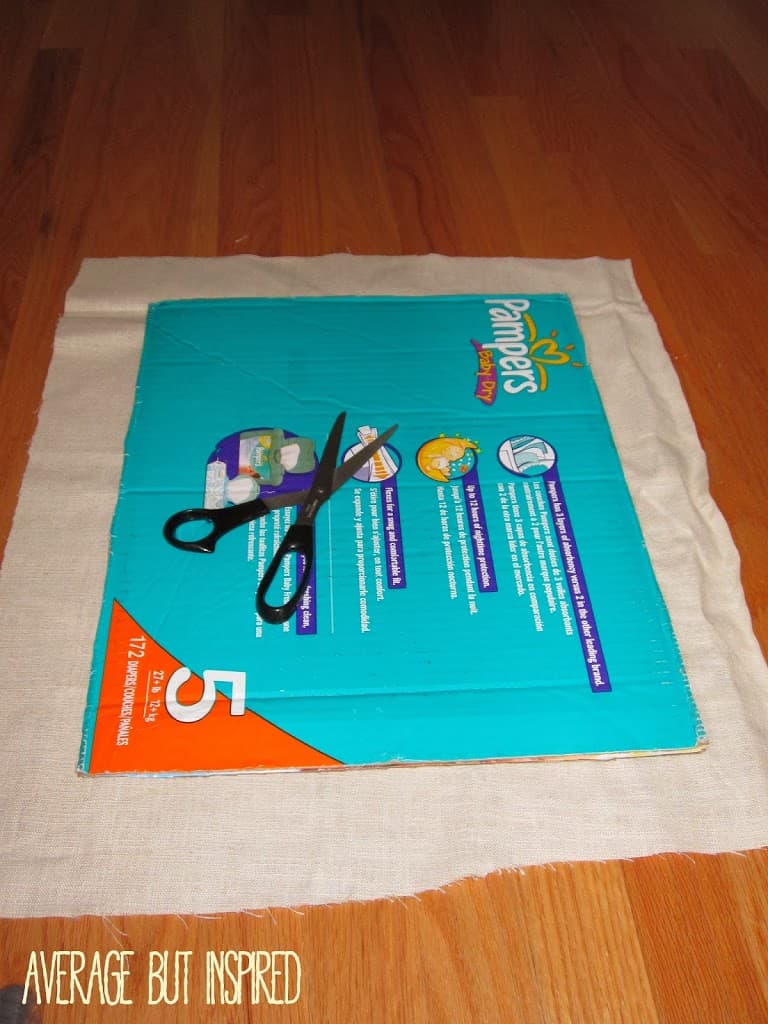
Next, cut the fabric that will cover the base piece by laying that fabric on top of the cardboard and cutting so that approximately 2″ of fabric hangs over each side.

Upcycle a cardboard box into a DIY wall organizer! Covering the cardboard with fabric helps it look pretty.

Using the spray adhesive, spray the front side of the cardboard with the adhesive and smooth the fabric over it.  I recommend doing this outside.  The excess fabric will be hanging over each side, with no adhesive on it.

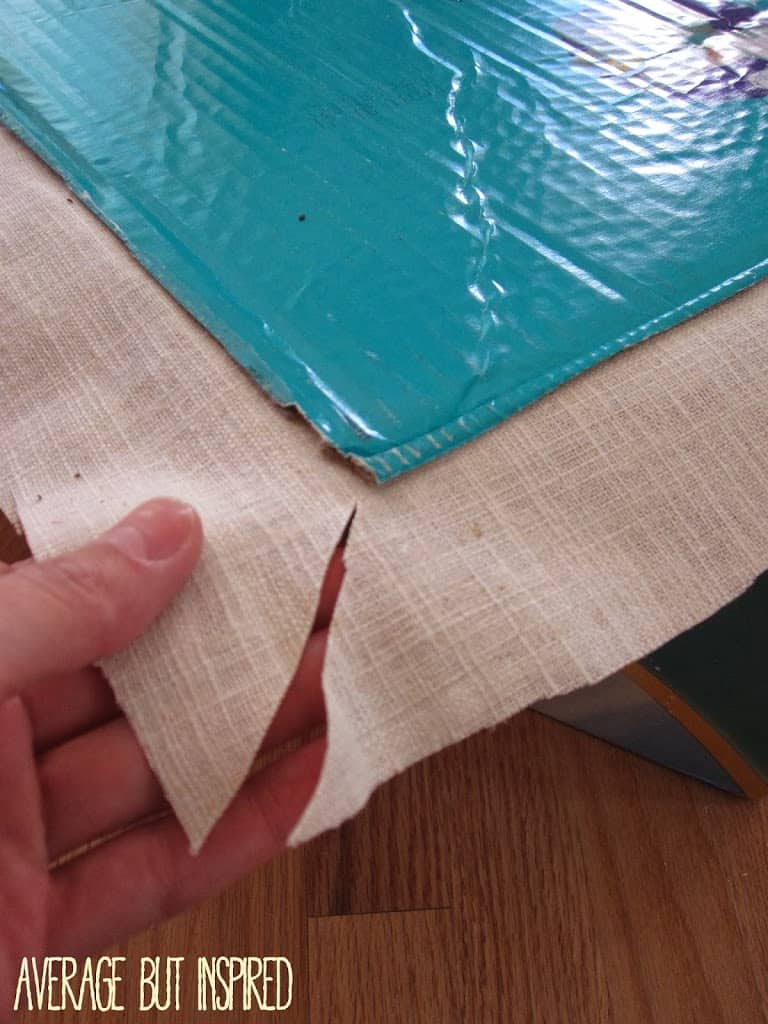
Then, cut a diagonal slit in each corner of the excess fabric.  This will allow you to fold the fabric inwards for gluing much more easily.

Learn how to upcycle a cardboard box and turn it into a wall pouch to keep things organized.

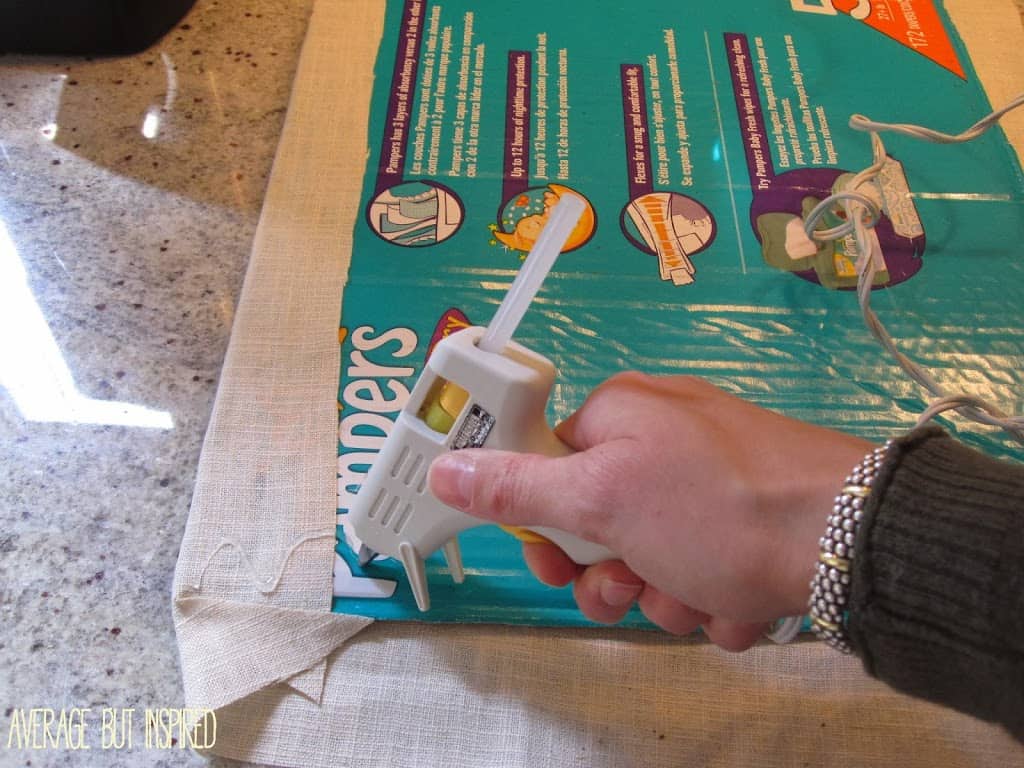
Use the hot glue gun to fasten the excess fabric of your base piece to the back of the base cardboard.

Create a cardboard box wall organizer.

Making the Wall Organizer Pockets

Next, determine how large you want the fabric pockets to be.  Mine are approximately 8″ tall, so I cut my fabric 9.25″ tall by the width of my box plus 2″.

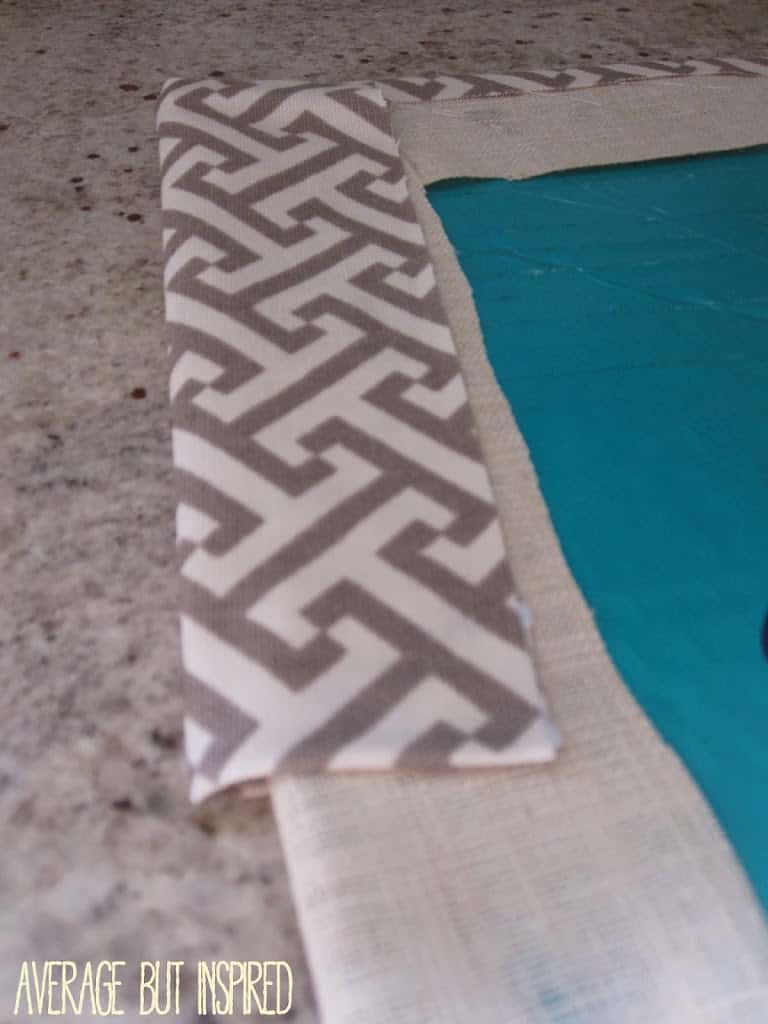
To create a nice edge, fold the bottom of the fabric in approximately .5″ and iron it flat.

Create pockets with fabric to add to a DIY wall organizer.

If you’re creating two pockets, repeat that process on the second piece, and also do this to the top of that fabric pocket.

Next, glue the ironed seams down with hot glue.

Attaching the Pockets to the Base Cardboard

Once the pockets are glued, hot glue the bottom pocket to the fabric-covered base board.  I took the un-ironed side and hot glued it around the base of the cardboard.

Next, wrap the pocket sides around and hot glue them down.  I pulled the fabric tight at the base and left a little more of a gap at the top in order to make the pocket a bit roomier.  You can see the gap in the photo below.

Ironing the edges of fabric to create pockets for a DIY wall organizer gives a clean look.

Take the fabric piece that has both the top and bottom seam glued down.  Hot glue the bottom edge finished seam to the front of the base board. Then, repeat the process of wrapping the fabric around the sides of the cardboard and hot gluing.  The back of your board will now look like this:

This is the back of a cardboard box wall organizer.

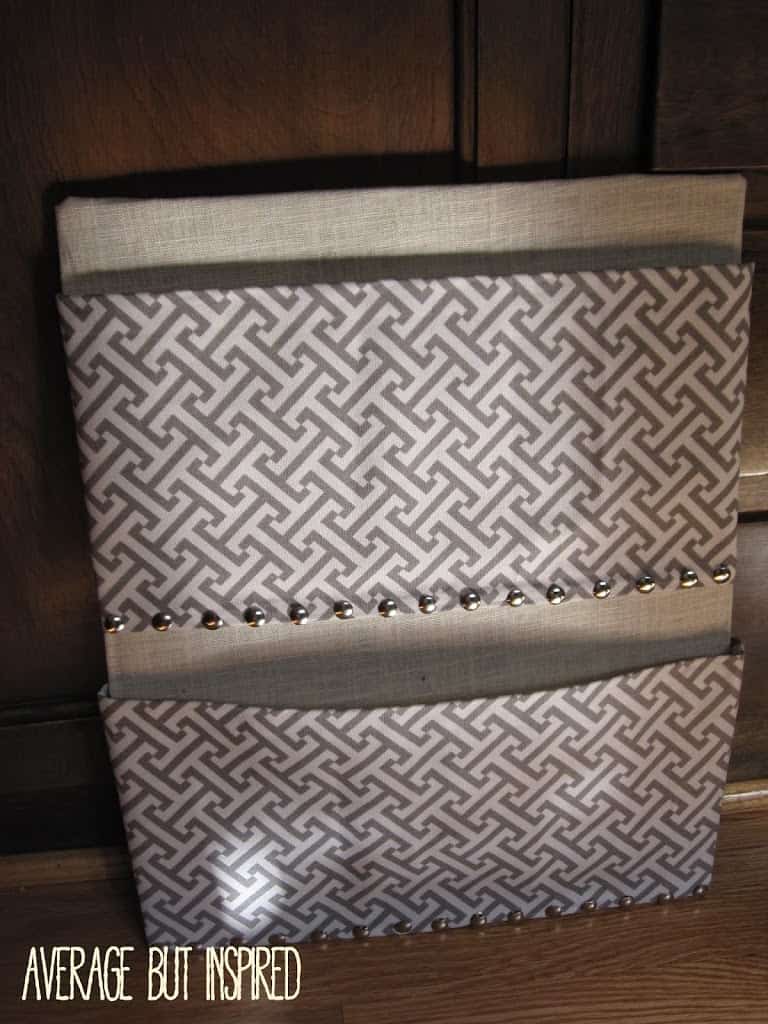
For added style, press in metal thumbtacks around the base. These look like nail heads and add a cute touch.

This is a cardboard box that has been transformed into a pretty DIY wall organizer.

I hung this directly on my wall with 3M Command Picture Hanging Strips.  I seriously love those things.

This is such a great cardboard box idea, and an awesome way to help your countertop or desk stay clutter free! Let me know if you have any other great cardboard upcycling ideas to share, too! I love to hear from you in the comments and on my social media!

Filed Under: Crafts, Organization

Dollar Tree DIY Fourth of July Decor: Firecracker Decorations

May 19, 2022 by Bre 1 Comment

Have you seen a cuter Dollar Tree DIY Fourth of July Decor project? Make these DIY firecrackers to light up your holiday display!

Put your patriotic spirit on display with this Dollar Tree DIY Fourth of July Decor project. These DIY firecracker decorations will put the sparkle in your celebrations!

Make these DIY firecracker decorations for your Fourth of July decor! This is an easy Dollar Tree DIY Fourth of July decor idea.

This post contains affiliate links. Please read my disclosure policy for more information.

As soon as I saw some adorable vertical signs with star cutouts at Dollar Tree, I knew I had to turn them into firecracker decorations for my Fourth of July decor. I could see them looking perfect with my Dollar Tree DIY Fourth of July Wreath!

The signs are sturdy and well-made, so they’re the perfect base for a lasting holiday decor piece.

Let me show you how to make your own patriotic firecracker decor with Dollar Tree supplies – you’re going to love this!

DIY Firecracker Decor Supplies

These are the supplies I used to make the firecrackers as shown in this post. Feel free to substitute items to personalize this project however you like!

  • The star cutout vertical signs I used are no longer sold, but you can use these Dollar Tree wood planks and stencil on a star or glue on a star.
  • Six thin wood pieces, like the Dollar Tree Tumbling Tower game pieces
  • Masking tape
  • Craft paint – red, white, and blue
  • Silver pipe cleaners or chenille stems
  • Burlap ribbon
  • Craft knife and ruler
  • Hot glue gun
  • Paint brushes – 1″ craft brush and foam dauber
  • Recommended: wood filler

Dollar Tree DIY Fourth of July Decor Instructions

First things first, if you make this I recommend doing something I did not do: fill the holes at the top of the signs once you remove the twine hangers. I should have done that!

Once the wood filler is dry, use a craft knife and a ruler to cut two of the vertical signs at the base. You’ll want to have each of the signs be a different height.

Dollar Tree vertical signs with star cutouts are the perfect base to make DIY firecracker decorations for the Fourth of July.

Next, paint these bad boys.

I taped them off so that I could paint the tops blue and the bottoms red.

Once that paint dried, I added polka dot detailing to the bottoms of two of the firecrackers with a foam dauber. I taped off the center of the other firecracker so that I could paint a stripe.

Dollar Tree star cutout signs are the perfect base for DIY firecracker decor.

To add dimension to this firecracker display, I hot glued game pieces from Dollar Tree’s version of Jenga along the edge of two of the firecrackers, and then glued the firecrackers on top of one another.

Use Dollar Tree Jenga wood blocks to make space between the firecrackers.

This helped separate the firecrackers from one another and gave the decor more of a 3D look.

I wrapped silver pipe cleaners around my fingers and glued those to the top of each firecracker, because obviously these needed wicks!

Pipe cleaners serve as wicks on these festive Fourth of July firecracker decorations.

And finally, I tied them all together in a cute little firecracker bundle with some extra-wide burlap ribbon. (Don’t worry – I made sure to bush off all of the pipe cleaner and ribbon debris you see in this picture!)

Tie the firecrackers together with burlap ribbon to create a cute Fourth of July decoration.

The Finished DIY Firecracker Decorations

And with that, these patriotic firecracker decorations were ready to go on display! First I tried them outdoors . . .

Make these DIY firecracker decorations for your Fourth of July decor! This is an easy Dollar Tree DIY Fourth of July decor idea.

and then I moved them inside next to the limewashed stone fireplace.

Make these DIY firecracker decorations for your Fourth of July decor! This is an easy Dollar Tree DIY Fourth of July decor idea.

I can’t decide where I like them better! Maybe they’ll just keep moving around, or maybe you’ll leave me a comment below and let me know where you think they look best!

Filed Under: Dollar Tree, Patriotic Tagged With: Dollar Tree, Summer

DIY Bowl with InstaMorph Moldable Plastic

April 12, 2022 by Bre Leave a Comment

Learn how to make a DIY centerpiece bowl with InstaMorph moldable plastic.

In my humble opinion, the best way to feel creatively inspired is to try new things.

Lemme tell ya – I definitely tried something new with this DIY centerpiece bowl project! Creative inspiration: check!

This DIY "marble" bowl is made from InstaMorph moldable plastic! InstaMorph melts in water and is moldable by hand, giving you tons of project options. Learn how to make this DIY bowl in this post.

Thank you to Sorfeo for sponsoring this post. The project and all opinions expressed herein are my own. Also, this post contains affiliate links. For more information, please read my disclosure policy.

Using InstaMorph moldable plastic I created a marble-look centerpiece bowl. And the best part? I had so much fun figuring out how to bring this vision to life!

What is InstaMorph Moldable Plastic?

Before I jump into showing you HOW I made this centerpiece bowl, I need to tell you about InstaMorph.

Otherwise you’re going to be totally confused as I take you through the steps of the project, because it involves turning these small plastic balls into the bowl pictured above.

InstaMorph moldable plastic melts in water and is moldable by hand. It can be used for DIY projects, crafts, and more.

So, what is InstaMorph? Well, the “sciency” description is that it’s non-toxic thermoplastic that can be melted and molded by hand when warm (like clay), but hardens to a strong plastic when cooled.

Here’s my description: InstaMorph is magic. It’s small plastic beads that you melt in hot water and use to create all kinds of amazing things, from practical (think household repair solutions) to theatrical (think cosplay and costuming). There are all kinds of InstaMorph project ideas on their website.

DIY InstaMorph Bowl Supplies

Now that you have a better understanding of what we’re working with, here’s a list of the supplies used to create the project as shown in this post. Of course you can modify it to fit your own style!

  • InstaMorph moldable plastic (12 oz. bag)
  • InstaMorph Pigment Pack (The Pigment Pack comes with red, blue, yellow, and black pellets, but the InstaMorph website has a color mixing chart to show you how to create any color imaginable.)
  • E6000 glue
  • Ceramic bowl (to use as a mold)
  • Wood bowl (to use as a pedestal base)
  • Stove, pot, kitchen tongs, and water

How to Make a DIY Bowl with InstaMorph

For this project, my goal was to create a bowl that looked like a sculpture. InstaMorph was the perfect medium to achieve that goal!

Preparing the InstaMorph

To start, I boiled water on the stove and let the water cool down ever-so-slightly. I then poured InstaMorph into the pot, along with a few black InstaMorph Pigment pellets. (A little goes a long way with the pellets, so don’t overdo it. Start with one or two, and add more if needed.)

I watched in amazement as the white pellets turned clear within minutes of being added to the hot water.

This is InstaMorph melting on the stove top, with black pigment pellets inside.

After about two minutes, I used tongs to carefully remove a piece of InstaMorph from the water. I shook off the excess water into the pot, and then carefully kneaded the InstaMorph together to create a swirled marble effect.

Use extreme caution when removing InstaMorph from the hot water. You do not want to burn yourself.

Create a marbled effect in InstaMorph with regular InstaMorph and black pigment pellets.

Creating the Bowl

Once the InstaMorph was heated and moldable, it was time to start creating the bowl.

Working with a small chunk of InstaMorph at a time (I left the extra InstaMorph in the pot on the stove, on the lowest heat setting), I kneaded and flattened the InstaMorph. Then I pressed it onto the side of a ceramic bowl.

To create a DIY bowl with InstaMorph, press pieces to a ceramic bowl, which is being used as a base or template.

I pressed each piece together at the edge in order to connect them, and I repeated this process all the way around the bowl.

This DIY centerpiece bowl made from InstaMorph is a work in progress. This is a great InstaMorph project idea.

As the InstaMorph hardened on the bowl, the pieces got lighter as they turned from clear and black to white and black/gray, much like marble.

This is a sculptural centerpiece bowl being made from InstaMorph.

Once the ceramic bowl was covered with InstaMorph pieces, I set it aside for a couple of hours to fully harden. (**Full disclosure: I actually left it for hours to take my kids bowling, where I was destroyed and humiliated. Ha!)

Then I gently removed the InstaMorph “bowl” from the ceramic bowl, and was relieved it all came off in one piece!

Had it separated, I could have either glued the pieces together or melted them back together by dipping them into hot water.

This is the shell of the DIY bowl made from InstaMorph.

To reinforce the seams or connections, I dipped part of the bowl into hot water for a few seconds, and rotated the bowl until every piece got a little extra “melting” time.

Attaching the Pedestal Base

To give this centerpiece bowl some warmth, and to contrast the marble look, I then flipped over a wooden bowl and glued the InstaMorph bowl to it.

Adding a wood pedestal to the marble look centerpiece bowl adds warmth.

This created a pedestal of sorts, making this DIY centerpiece bowl even more lovely. (Note: if you don’t want a pedestal stand, you can simply cover the base of the ceramic bowl with InstaMorph in the same way as you did the sides.)

The Finished InstaMorph Moldable Plastic Bowl

After the glue hardened, I displayed the bowl in my living room and was thrilled to see how pretty it looks against the wallpapered bookcase!

Learn how to make a DIY decorative bowl with InstaMorph moldable plastic.

The swirled marble appearance is very cool, and I’m dreaming up all the ways I can use InstaMorph on other projects. Next up I’m thinking of trying InstaMorph in silicone molds to create furniture embellishments.

This marble look centerpiece bowl is created with InstaMorph moldable plastic. This is a cool InstaMorph project idea.

Let me know how you would use InstaMorph moldable plastic – the opportunities are endless!

Filed Under: Crafts

  • « Go to Previous Page
  • Page 1
  • Page 2
  • Page 3
  • Page 4
  • Page 5
  • Interim pages omitted …
  • Page 22
  • Go to Next Page »

Primary Sidebar

Let’s Connect!

Hi, I’m Bre! Thanks for visiting Average But Inspired, where I show you how to work with what you’ve got to create a home you love.

Bre of Average But Inspired - a DIY and craft blog

Love DIY? Subscribe to Get Posts E-mailed!

How Can I Help You?

blank

How to Paint a Countertop to Look Like Marble!

blank

How to Paint Over Tile

blank

Limewash Stone Fireplace Makeover: Bye Bye Orange Stone Fireplace, Hello Neutral Stone Beauty!

blank

How to Create a Faux Antique Brass Finish with Paint

Looking for Something?

Copyright © 2013-2022, Bre Eggert (Average But Inspired). All rights reserved.
  • Home
  • DIY
  • Crafts
  • Home Decor
  • Privacy Policy and Copyright Policy
  • Disclosures
  • Contact Me